
Every show on this Mac and every web show of your companies in one window: make, open and close shows, start one from a web show, and keep the list tidy.
The Show Manager is where every show is made, opened and closed, without hunting through folders: the shows on this Mac with when they were last saved and where they live, and the web shows of your companies on liveproducer.ai. One show is open at a time.
Open it with File › Show Manager (⇧⌘O), which brings it forward on the tab it was on while the open show stays open. File › Open… (⌘O) brings it forward on On This Mac, and File › New Show… (⌘N) brings it forward with the New Show sheet. It also comes back when you close a show, and the Studio can start on it.
Toolbar
Section titled “Toolbar”The two tabs, On This Mac and On liveproducer.ai, are a group of keys: a lamp lights above the chosen one. ⌘1 and ⌘2 switch between them. Filter, on the display at the right, narrows the list by name.
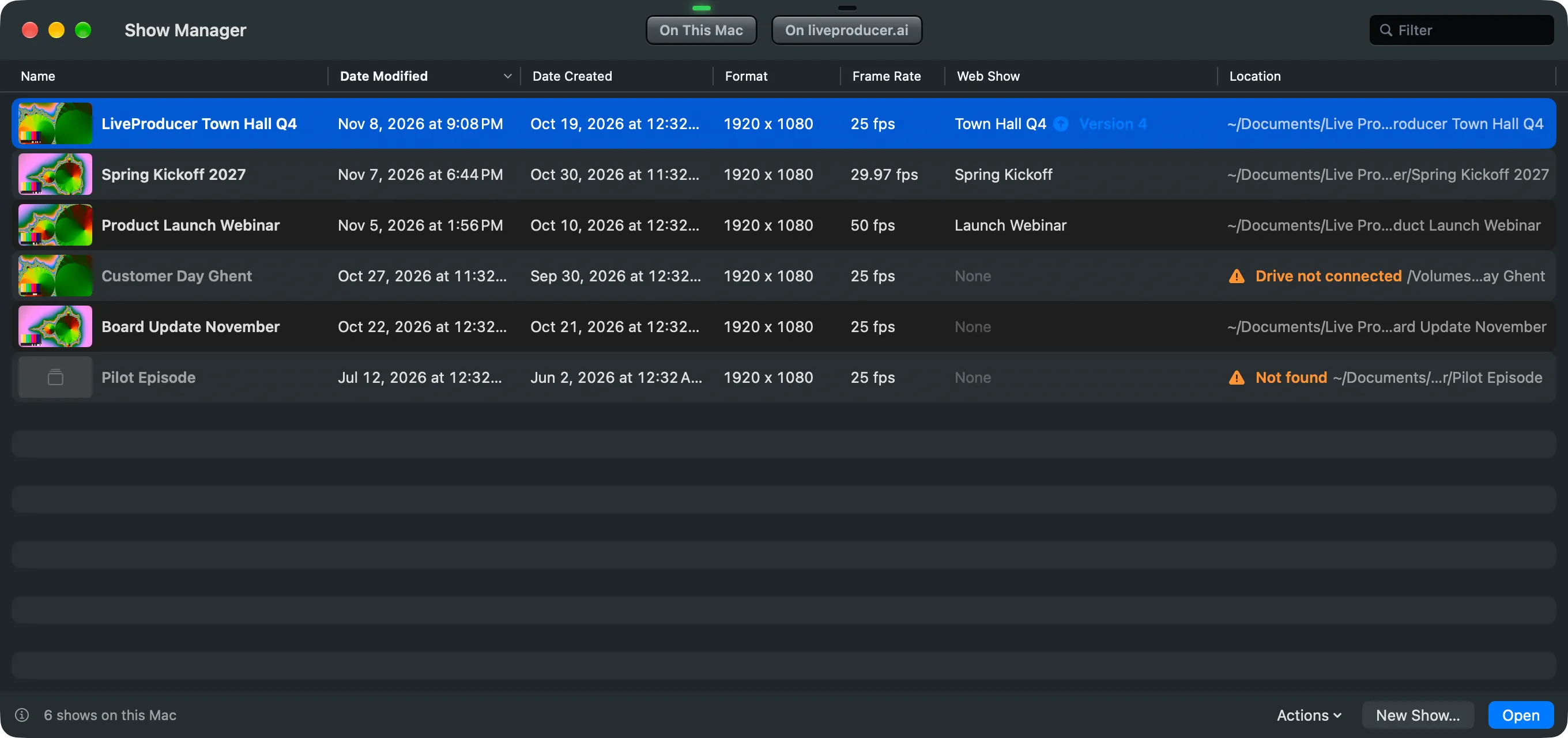
On This Mac
Section titled “On This Mac”Every show you made, opened or saved on this Mac, newest first. Click a column’s title to sort by it.
| Column | Shows |
|---|---|
| Name | The show’s picture, taken when it was last saved, and its name. Open marks the show that is open now. |
| Date Modified, Date Created | When the show was last saved and when it was made. |
| Format, Frame Rate | The program’s size and the show’s frame rate. |
| Web Show | The web show it is connected to and the version it pulled; a newer published version is marked. |
| Location | Where the show file is. Drive not connected or Not found when the Studio cannot reach it. |
Double-click a show, or select it and press Return, to open it. Opening another show replaces the open one. The Studio asks first when the open show has unsaved changes, and when it is live: see Shows.
The foot of the window holds the window’s own buttons:
| Item | Does |
|---|---|
| ? and the count | This page, and how many shows are on this Mac. |
| Actions | The selected show’s commands (below), then Open Other… for a show file or show folder anywhere on the Mac, and Add Existing… to put shows made elsewhere on the list. |
| New Show… | Makes a show and its show folder, in a sheet on this window. See Create a show. |
| Open | Opens the selected show in place of the open one. |
Right-click a show, or use Actions, for the rest:
| Command | Does |
|---|---|
| Show in Finder | Opens the show’s folder. |
| Locate… | For a show the Studio cannot find: point it at the show file or folder where it is now. |
| Rename… (⌘R) | Renames the show folder and the show file together. |
| Duplicate | Copies the show folder as a new show, without its recordings. |
| Connect to Web Show… | Connects the show to a web show without opening it; pull its script later in the Script window. |
| Remove from List (Delete) | Takes the show off the list. Its folder stays where it is; Add Existing… brings it back. |
| Move to Trash… | Moves the whole show folder to the Trash, recordings included, after saying how much it holds. Not for the open show. |
Drop a show file or a show folder on the list to add it.
On liveproducer.ai
Section titled “On liveproducer.ai”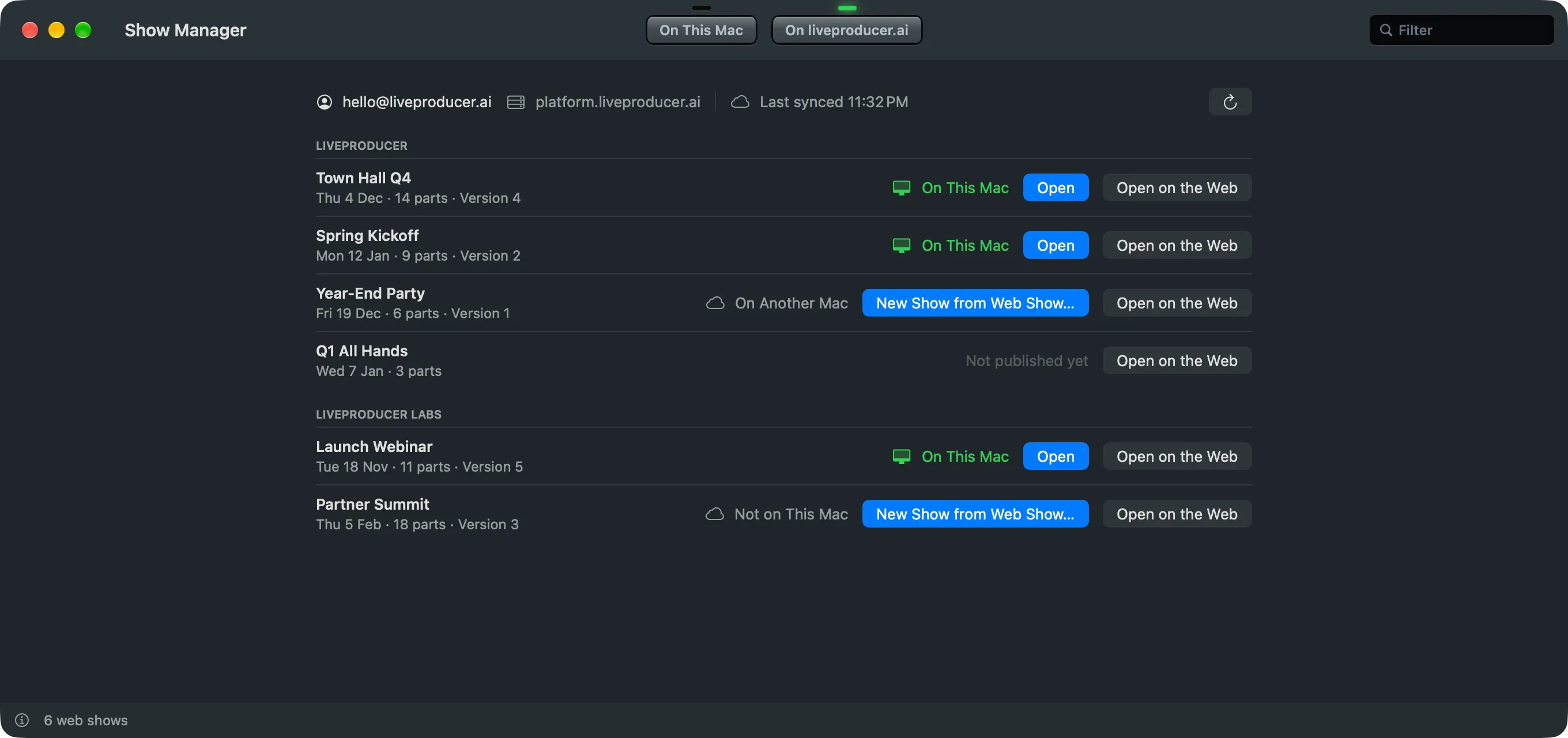
The web shows of every company you belong to, grouped by company. Each says whether it is On This Mac, on another Mac, or not published yet. The line at the top says who is signed in, the server the shows are on (such as platform.liveproducer.ai), and when the list was last synced; the button at its end asks liveproducer.ai for the list again.
| Button | Does |
|---|---|
| Open | Opens the show on this Mac that is connected to the web show. |
| New Show from Web Show… | Makes a new show with the web show’s name, then pulls its script and files into the new show’s folder. See Create a show. |
| Open on the Web | Opens the web show on liveproducer.ai in your browser. |
Signed out, the tab shows Sign In… at the top, over the last list, greyed: sign in there and the list fills. See Sign in. Without a network the tab shows the list as it was last received, with when that was; shows on this Mac open as always.
Closing the Show Manager
Section titled “Closing the Show Manager”With a show open, closing the Show Manager just puts it away; File › Show Manager brings it back. With no show open, the Show Manager is the Studio’s only window, so closing it asks Quit Live Producer?: Quit quits the Studio, Cancel keeps it open.
Read more
Section titled “Read more”Describes Live Producer 0.330 · 10 November 2026