
What differs between two versions of the script: side by side on the web, marked in the script in the Studio after a pull.
A show changes between two versions of its script, and both sides show exactly what: the web before a version is published, side by side, column by column, section by section; the Studio after a version is pulled, marked in the script itself. Every word and tag that differs is marked.
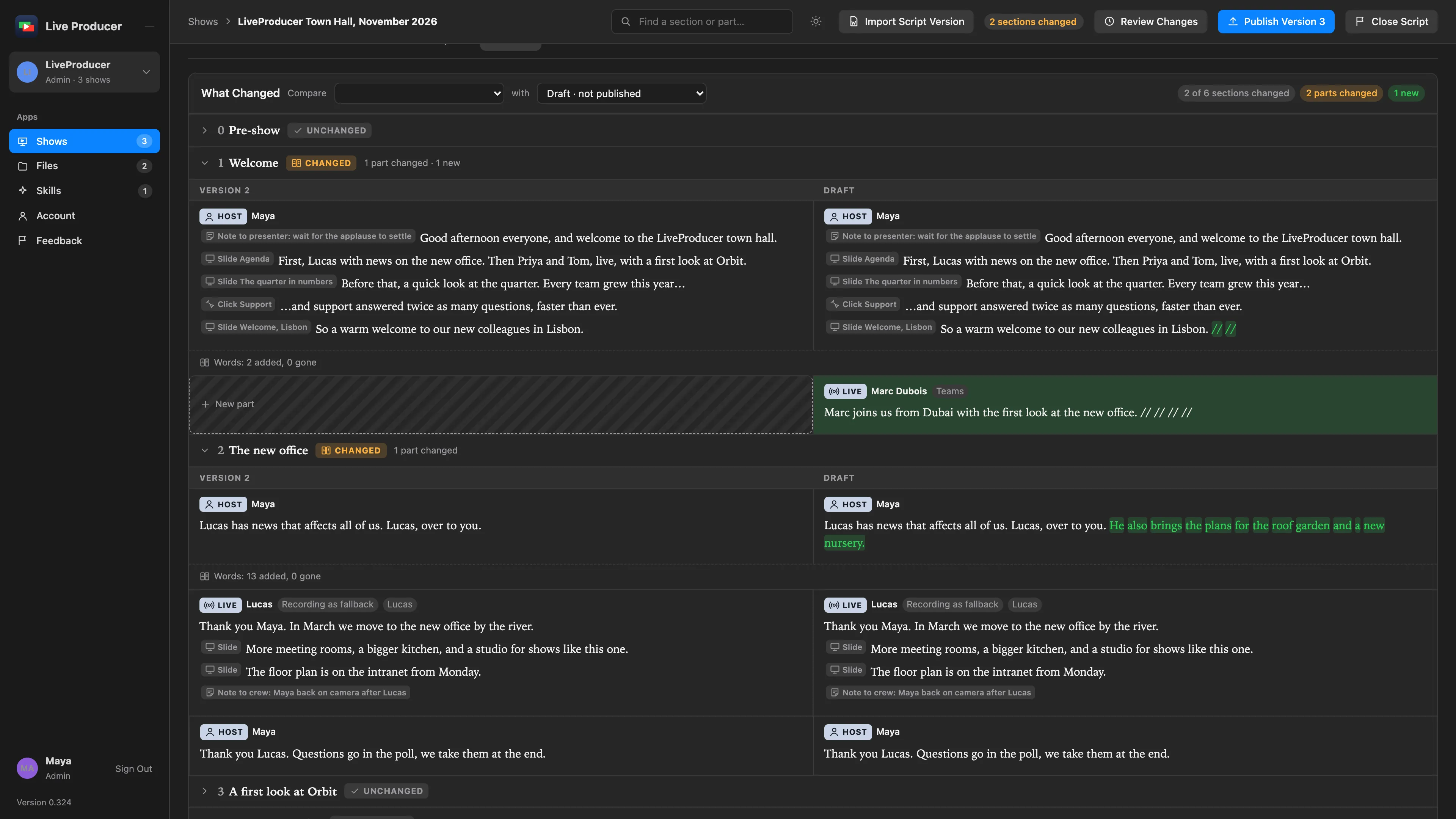
Aligned by what things are, not by how they read
Section titled “Aligned by what things are, not by how they read”A section and a part keep their identity across versions, because the tags in the script carry it. So the comparison never guesses: a part whose direction was reworded is still one part, shown as changed; a part moved to another section says Moved to and Was in, never removed here and new there; and a section started in the middle of another is New, with Split from the section its parts came from. A section whose only change is its number, because one was added, moved or removed before it, is Renumbered, apart from real changes. The Studio keys its sections by identity too, so a renumbering changes nothing on the switcher.
What is marked
Section titled “What is marked”| In the words | Drawn as |
|---|---|
| A word gone | Struck through, in the removed tone, in the earlier version’s column |
| A word new | Highlighted in the added tone, in the later version’s column |
| A tag added or removed | Its chip in the added or removed tone |
| A tag whose fields changed (another shot, another person, another duration) | Its chip in the changed tone on both sides |
| A tag that moved to another word | Its chip in the changed tone, with where it was and where it is |
A tag that only follows new words has not moved: it is still at the same word of the ones both versions share. A part’s head (its kind, who is on, a recording as fallback, its media, its minutes) is compared the same way, and each change is one line under the two columns.
Where it shows
Section titled “Where it shows”- On the web, Review Changes beside Publish compares the draft with the last published version, so the showrunner sees what will go out before it does, and the Versions tab compares any two versions.
- In the Studio, after a pull the web show bar says what the version changed, and the Script window marks it in the script: New, Changed, Moved from or Removed beside a part or section, new words and tags in green, and a line for what went. Hide Changes draws the script without the marks and Dismiss clears them. The Mac never edits the script. See Script window.
What it means for the switcher
Section titled “What it means for the switcher”A pull changes nothing on the switcher. What the new version asks for, such as a lower third for a new presenter or a shot for a new clip, is listed by Suggest Setup Changes in the Script window, each row applied or skipped by the operator, with Spelvin’s suggestions under them when the account has Spelvin. See Setup from the script.
Read more
Section titled “Read more”Describes Live Producer 0.330 · 10 November 2026