
Open a show's script, type in it with the others, and know which sections are yours.
Write and change a show’s words on the web at the same time as the others, with no files to send around and nothing to save. To read how the editor works, see Script editor.
Before you start
Section titled “Before you start”- You are a member of the company. An admin or a showrunner edits the whole script; a contributor edits the sections assigned to them. See Invite people.
- The show exists. See Create a web show.
Step 1: Open the script
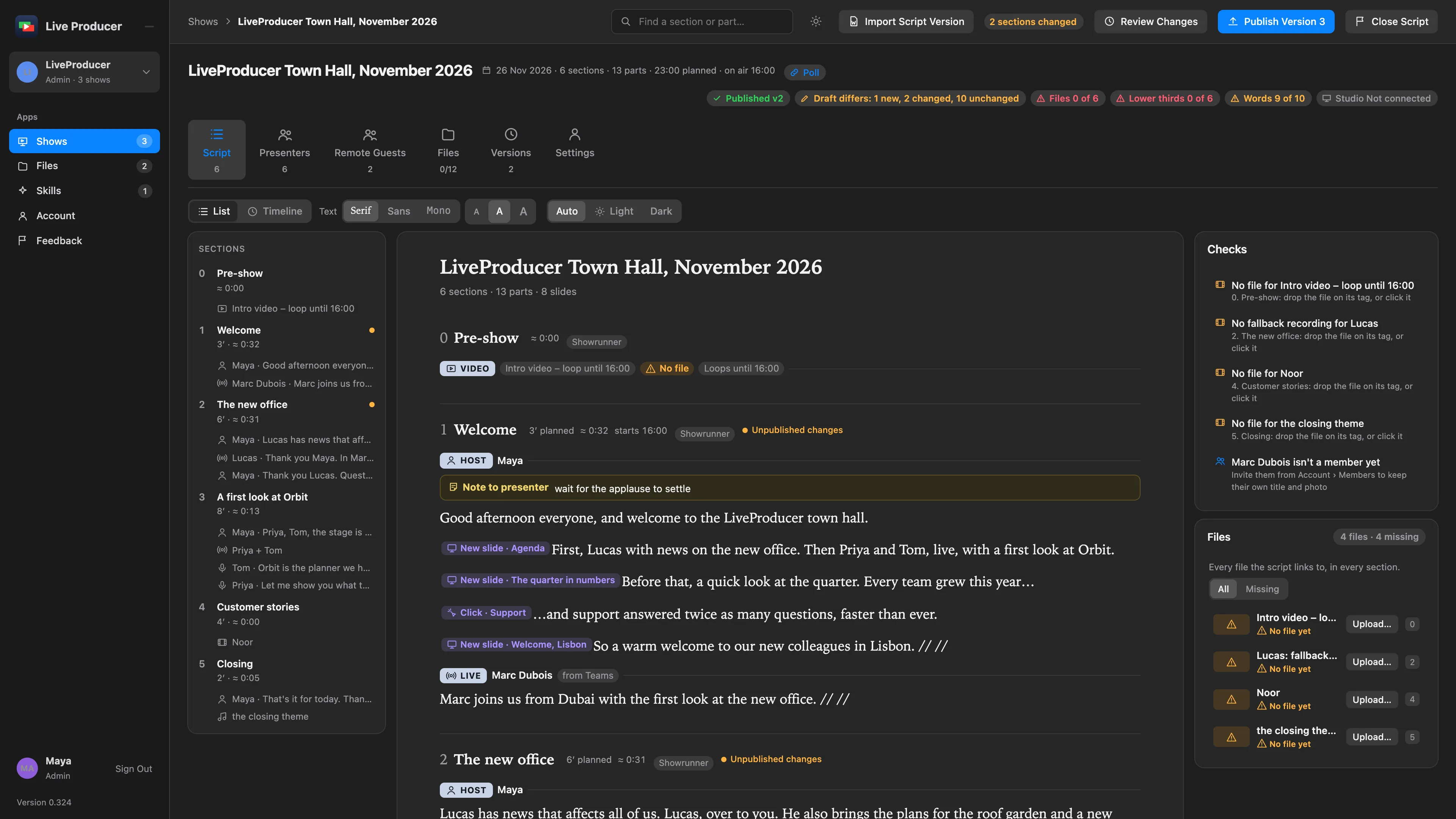
Section titled “Step 1: Open the script”On the Shows page, open the show. Its Script tab is the script: the outline on the left, the sections in order beside it, each with its number, title, planned time and who edits it, and beside them the Files card with the files the script plays. Click a section or a part in the outline to scroll to it.
Step 2: Type
Section titled “Step 2: Type”Click in a section and type, as in any document: Enter starts a paragraph, Undo takes back your own last change. A direction for the show (who is on, a slide click, a script tag, a note) is a tag; see Insert a tag. There is nothing to save: every change is in the draft as you make it.
Step 3: See the others
Section titled “Step 3: See the others”Everyone who has the show open and may edit a section is in it with you. Their cursor shows in their colour with their name, and what they type appears at once. When you and someone else change the same sentence, both changes stay.
Step 4: Know what is yours
Section titled “Step 4: Know what is yours”A section you edit has a bar in your colour down its left edge and You edit in its head, in the outline too. A section that is read-only for you is dimmed and says Read only with who edits it: you can read it and open its tags to see their fields, but not change it. A showrunner, who edits every section, sees no bar. When the showrunner has closed the script, every section is read-only, under a banner that says who closed it; see Close the script.
If Reconnecting… shows in a section’s head, the page has lost its connection to the platform and is getting it back by itself.
Step 5: Set how the script reads
Section titled “Step 5: Set how the script reads”Under Text, above the script, choose Serif, Sans or Mono, and Small, Medium or Large. This is your browser’s choice only; the others keep theirs.
Verify
Section titled “Verify”- Reload the page: the words you typed are in the section.
- The others see your words as you type them, and you see theirs.
- The show’s header says Draft differs: the words reach the Studio when the next version is published and the operator pulls it. See Publish a version.
Related
Section titled “Related”Describes Live Producer 0.330 · 10 November 2026