
Solo, Team and Business: what each includes, editor seats, yearly or monthly, Stripe as the seller, the trial, and what happens when a payment fails.
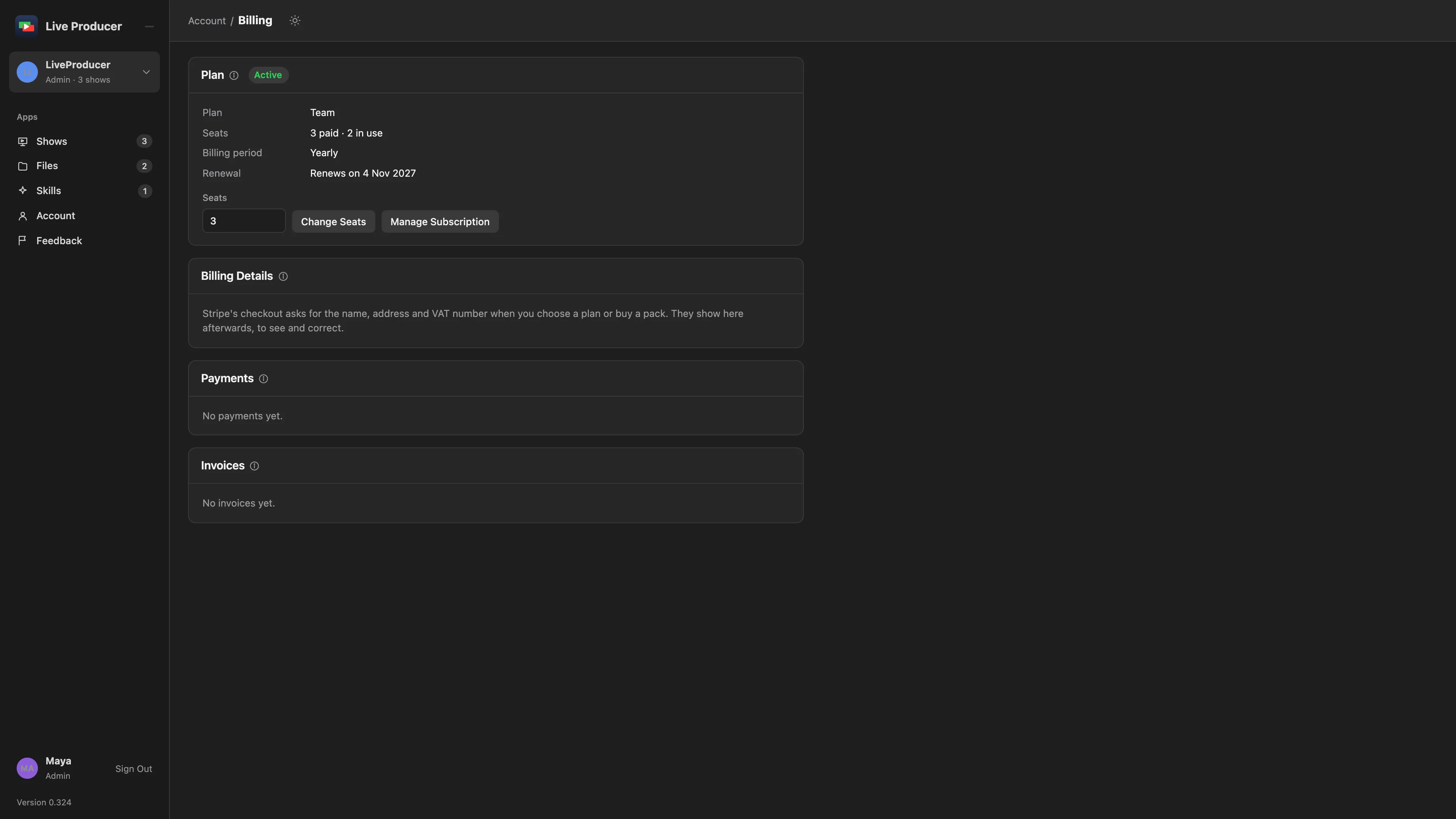
A plan sets what a company can do on the Live Producer Platform: how many people prepare shows, how many shows are open at once, how much room the files have and how much Spelvin helps. Everything on your Mac is free on every plan; you pay for other people and for our servers. You choose a plan on the Billing page, pay by card, and every invoice is there to download for your bookkeeping.
The plans
Section titled “The plans”Every company starts on Solo, which is free and needs no card. It runs a complete show for one person. When more people prepare the shows, or more shows run at once, a paid plan takes the limits up.
| Plan | For | Price |
|---|---|---|
| Solo | One person and one Mac: the whole Studio, one show open on the web, two remote guests. | Free |
| Team | A crew preparing shows together: 3 editors included, 15 shows open, 3 Macs in a show, the green room. | €49 a month, billed yearly |
| Business | An organisation: 10 editors included, separate workspaces, 50 shows open. | €149 a month, billed yearly |
Prices exclude VAT. Business is not on sale yet; write to support@liveproducer.ai if you need it now. The full table of limits is on the Billing page next to each plan.
Never limited, on any plan: sources, layers and transitions; the audio mixer; program and ISO recording and streaming; live captions on the program; the prompter, the phone remote and the Stream Deck; reading a script with the built-in rules. There is no watermark on the program, on any plan.
Editor seats
Section titled “Editor seats”An editor is a member with the role admin or showrunner, other than the company’s owner: the people who make and publish shows. Contributors, guest presenters and the Billing role are free on every plan. See People and roles.
Team includes 3 editors and Business 10. Each extra editor costs €12 a month billed yearly (€14.40 billed monthly), up to 15 editors on Team and 50 on Business. You can add editors any time, for example before inviting a new showrunner.
Yearly or monthly
Section titled “Yearly or monthly”A plan is billed once a year or once a month; monthly costs 20% more. The plan cards show both: switch between Yearly and Monthly above them to compare.
The prices shown include 21% Belgian VAT. The VAT you pay depends on your country and on whether your business has a VAT number; the invoice shows it.
Stripe sells for Live Producer
Section titled “Stripe sells for Live Producer”Payments go through Stripe. Stripe is the seller on the invoices, in the name Link, and takes care of the VAT in each country. That has a few effects you see:
- The invoice comes from Link (Sold through Link, LLC), with Live Producer on its line.
- Your card statement shows a charge from LINK.COM.
- Receipts and renewal mails come from Link.
- The card, the invoices and cancelling are on Stripe’s own page, which opens from Manage Subscription.
Billing details
Section titled “Billing details”The billing details are who the invoice is made out to: a business or a private person, the name, the full address and, for a business, the VAT number. You type them once, in Stripe’s checkout, when you choose a plan or buy a pack. Afterwards they show on the Billing page under Billing Details, where you can correct them and set an Invoice email: the address the invoices go to, for example your bookkeeper’s. A change goes on the next invoice.
Changes and what they cost
Section titled “Changes and what they cost”- More editors, or a bigger plan: start at once. Stripe charges the difference for the rest of the period straight away, on an invoice of its own.
- Fewer editors: start at once; the difference is a credit on the next invoice.
- A smaller plan, or monthly instead of yearly: start at the end of the period you paid.
- Cancelling: the plan runs to the end of the period you paid, then the company is on Solo. Changed your mind before then? Undo it under Manage Subscription.
- Coming back later: a new plan is at today’s prices.
When the card refuses a payment for added editors, the company keeps the editors it had and the page says so.
When a payment fails
Section titled “When a payment fails”When a renewal does not go through, the Billing page says so and Stripe tries again over the next days. Everything keeps working meanwhile, so a show the next morning is never in danger. Change the card under Manage Subscription.
When the last try fails too, the company is frozen. Nothing is taken away: every show, file, member and seat stays, and changes to them still save. Only new things wait: a new show, file, Skill, member or guest link. A banner on every page says so. Pay the open invoice on the Billing page and the company opens again at once. A payment that was refunded in full, or that your bank took back, freezes the company the same way; then write to support@liveproducer.ai.
A limit never stops a show
Section titled “A limit never stops a show”A limit only stops the next new thing, and says how to get past it. Downloads, pulls, the Studio’s sync and everything in the Studio keep working when a company is over a limit or frozen, and nothing is deleted when a company moves to a smaller plan.
The trial
Section titled “The trial”A company on Solo can try Team for 14 days, once, with no card. At the end it goes back to Solo, unless you chose a plan in the meantime; nothing is charged by itself.
The beta
Section titled “The beta”During the beta every company has Team’s limits, free, with no card and nothing charged. The Billing card on the Account page says Team during the beta, with the last day once the beta’s end is set. When the beta ends, what the company made stays; nothing is deleted. See Feedback for the year of Team or Business the most active beta testers get.
Spelvin packs
Section titled “Spelvin packs”When the company needs more of Spelvin than its plan’s allowance, a Spelvin Pack adds actions that are used only while you are over the allowance. You buy one on Spelvin’s usage page, on Team and Business, through the same checkout. See Actions and limits.
Plans that change
Section titled “Plans that change”When the plans on sale change, a company keeps the plan it has, at its price, as long as it likes. The Billing page shows it in a frame of its own above today’s plans. When a plan is retired, the company hears it by mail and on the Billing page at least 30 days ahead, and moves to the plan that replaces it at a renewal, never during a period it paid for.
Read more
Section titled “Read more”Describes Live Producer 0.330 · 10 November 2026