
The show written as one script, together and at the same time; the parts, slides, script tags and notes are tags in the text.
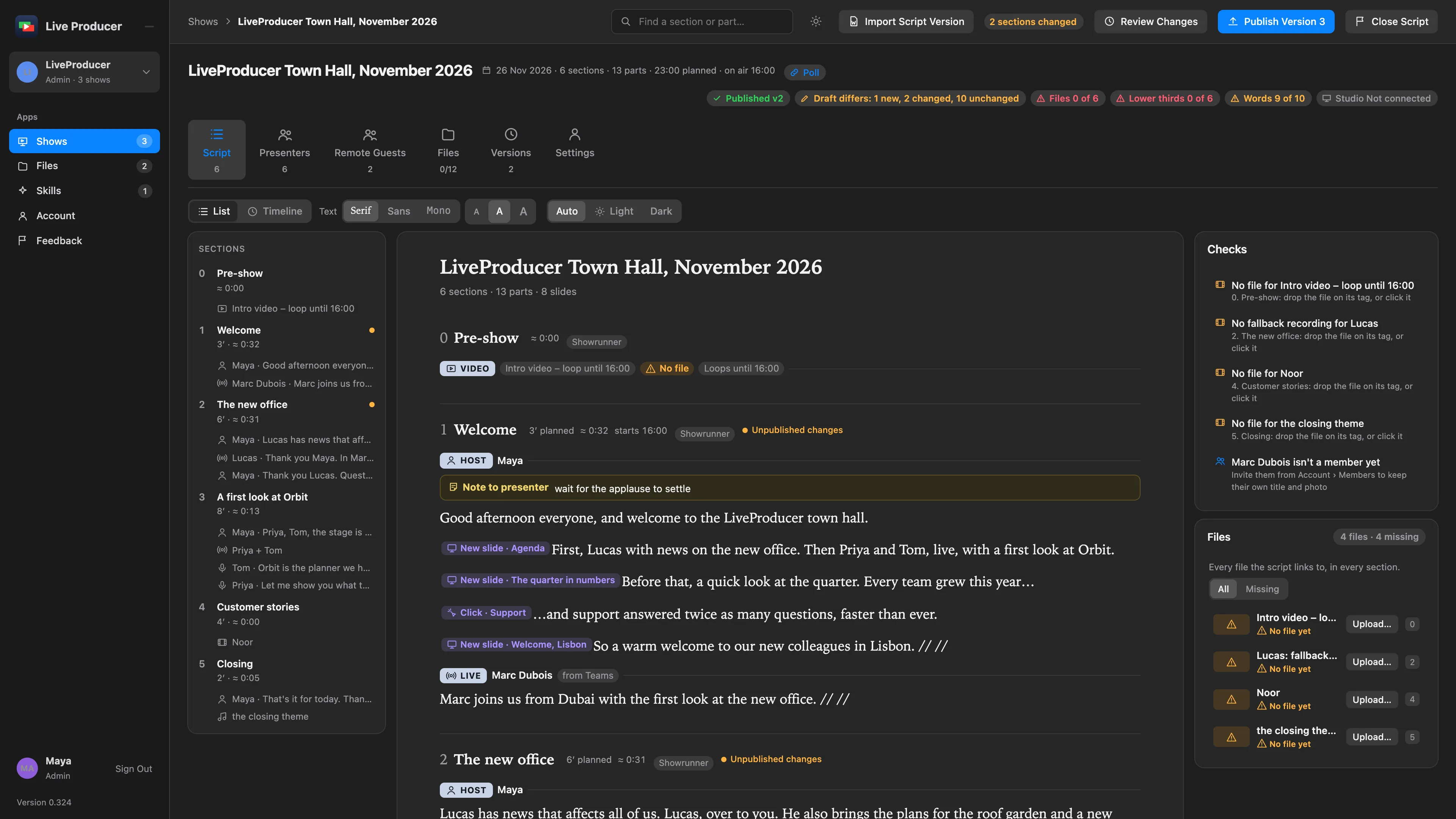
A show on Live Producer Platform is one script, on its Script tab. Everyone who may edit a section writes in it at the same time, as in a shared document, and the shape of the show (who is on, where the slide clicks, what the audience should see) is tags in the text. The script the Studio runs is read from those tags.
One script, written together
Section titled “One script, written together”People write a show the way they write anything: words to say, with directions between them. The editor keeps it that way. You read the show from top to bottom, section by section, and type where it needs changing. The others who edit it are on the same page: you see their cursors in their colours with their names, and what they type appears as they type it. Nobody saves and nobody overwrites anyone: every change lands in the draft as it is made, and two people changing the same section both keep their words. Undo takes back your own changes, never someone else’s.
A tag is one piece of the show’s structure, shown in the words where it applies. The editor draws each in its own tone with a symbol and a word, so you see the show’s shape without leaving the text.
| Tag | Says | Where it sits |
|---|---|---|
| Part | Who is on and how: Host, Live, Speaker, Recording, Video, Poll or Outro; for a live part, its fallback recording and where the person joins from | A line of its own; the words after it belong to it, up to the next part |
| New Slide and Click | The slides move to the next one, or build on the same one | In the words, where the click is |
| Script tag | A shot, lower third, graphic, sound or interaction the script asks for here; guidance only, it fires nothing | At its word; it moves with the words around it |
| Note | A note for the operator, for the presenter (also on the prompter) or for the crew (also on the phone remote) | A line of its own |
| Person | A presenter named in the words, who is then a presenter of that part | In the words, as the name |
You insert a tag from a menu or by typing a direction the old way, and a click on a tag opens its fields; see Insert a tag. What is not in the words is in the section’s head: its title, planned minutes, start time and who edits it.
Sections are the showrunner’s
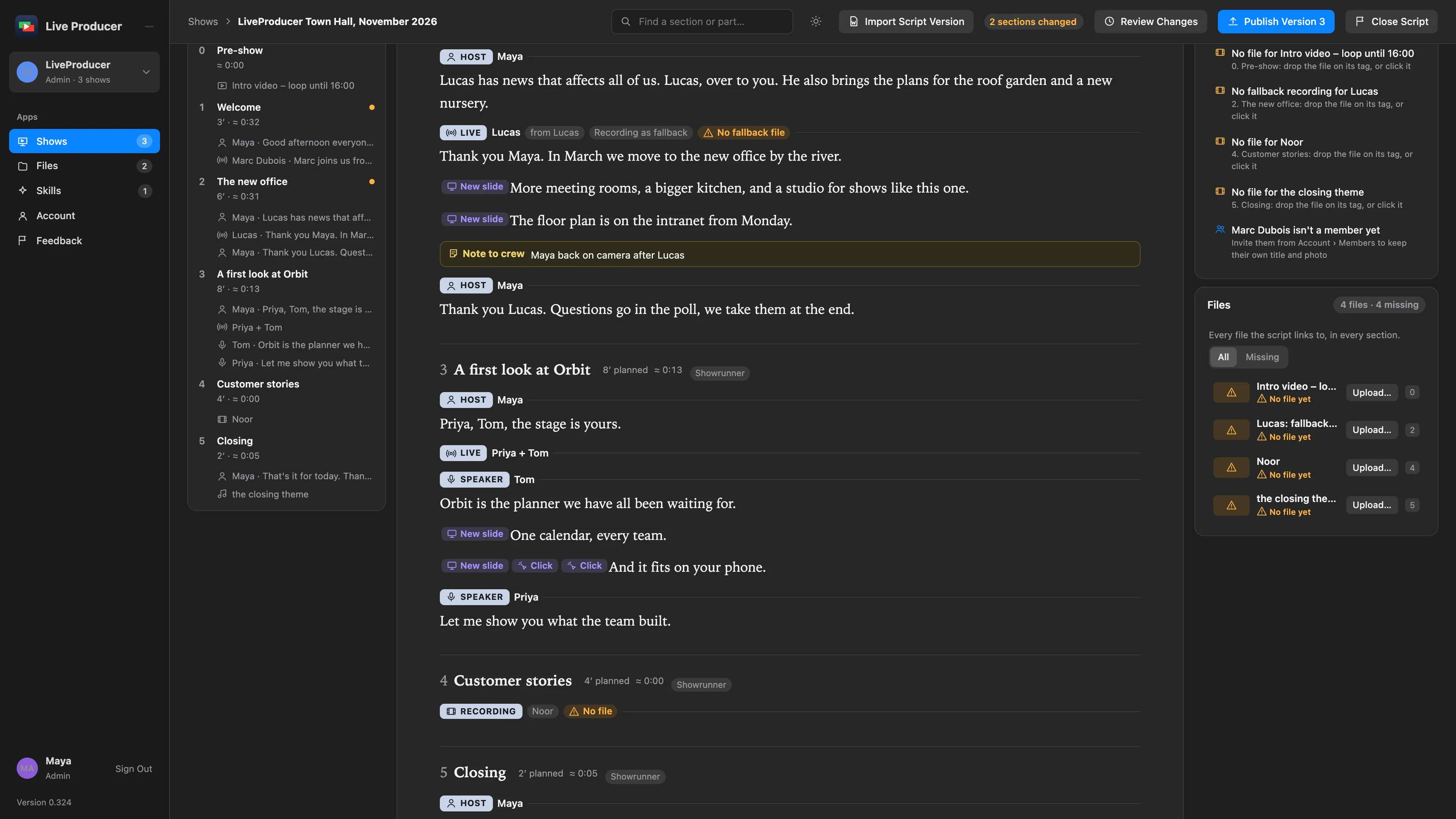
Section titled “Sections are the showrunner’s”Everyone writes words and tags; the sections themselves are the showrunner’s. A showrunner starts a section where the caret is (the words after it move into the new one), moves a section up or down, merges it with the one before it, deletes it, and says who edits it, from the section’s fields. A contributor sees all of it and changes none of it. A section’s number is its place in the show, never typed: a section started after 2 is 3, and the rest move up, in the script, the outline and the Studio alike. See Arrange the sections.
Yours or read-only
Section titled “Yours or read-only”An admin or a showrunner edits the whole script. A contributor edits the sections assigned to them and reads the rest; see Section editors. Your own sections carry a bar in your colour down the page’s left edge and You edit in their head, in the outline too, so you find them at once. A section that is not yours reads dimmed, with Read only and who edits it, and has no caret. When a showrunner makes you a section’s editor, in the section’s fields, it opens for you on the spot.
What the Studio receives
Section titled “What the Studio receives”Live Producer Studio never reads the script itself. The platform derives what the Studio receives from the tags: each part tag is a part with the words after it, each slide tag a slide mark, each script tag what to prepare at its word, each note a note. Nothing is guessed from the words, so a rewritten sentence is still the same part and a script tag stays on its word when the sentence before it changes. What the Studio gets comes through published versions: the team writes and publishes, and the operator pulls each version by hand. See Published versions.
Unpublished changes
Section titled “Unpublished changes”The Studio has the last published version; the team may be well past it. A section whose words or tags differ from that version says Unpublished changes in its head and carries a dot in the outline, so the showrunner sees where the show moved on without reading it all, and Publish Version N says how many sections changed. Publishing takes in everyone’s latest words first, then makes the version; the chips go with it. See Publish a version.
Files on their tag
Section titled “Files on their tag”A tag that plays a file (a recording, video or outro part, a live part’s fallback recording, a graphic or audio script tag) takes its file right there: dropped on the tag, or chosen in its fields. The tag shows the file’s name and length; without one it says No file with a warning symbol. The file is one of the show’s files, in versions, so the Studio downloads it as any file. The Files card beside the script lists every file the script links to, All or only the Missing ones, each with its section’s number; a row goes to its tag, with Upload… for a missing file and Replace… for one that is there. A contributor’s card lists the files of the sections they edit. See Upload a file on its tag and Files.
Checks
Section titled “Checks”The Checks card beside the script says what the show still lacks, worked out from the tags as you type, so nobody finds a gap at the desk. A row names the section and what to do; click it to go there.
| Check | Says |
|---|---|
| A host, live or speaker part with nobody named | Pick who is on in the part’s fields |
| A lower third with nobody named | Pick the person on the script tag |
| A shot, graphic, sound or interaction without a name | Say what it is on the script tag |
| No file for a recording, video, outro, graphic or sound | Drop the file on its tag, or click it |
| No fallback recording for a live part | The part asks for one; drop it on the part |
| A section runs long | Its words and clips take longer than its planned time |
| A presenter who isn’t a member yet | Invite them, so they can edit their part |
A contributor sees the checks of the sections they edit.
Spelvin in the script
Section titled “Spelvin in the script”Spelvin helps at the edges of the script and never restructures it: Tag with Spelvin suggests the tags in words that have none, drawn faint until someone accepts them, and a script version imported on the show, or a change the chat proposes and you apply, lands in every open editor at once. See Spelvin in the script.
Text, above the script, sets how it reads for you: Serif, Sans or Mono, and Small, Medium or Large. The tags grow with the words. The choice is your browser’s, never the show’s: the others keep theirs.
Read more
Section titled “Read more”Describes Live Producer 0.330 · 10 November 2026