
The Shows window lists every show on this Mac and your web shows, opens any of them in one click, and can be the first thing the Studio shows when it starts.
New and improved
Section titled “New and improved”The Shows window
Section titled “The Shows window”Find a show without hunting through folders. File › Shows… (⇧⌘O) lists every show you made, opened or saved on this Mac, newest first, with a picture of each, when it was saved, its format and frame rate, its web show, and where it lives. See Shows window and Open a show.
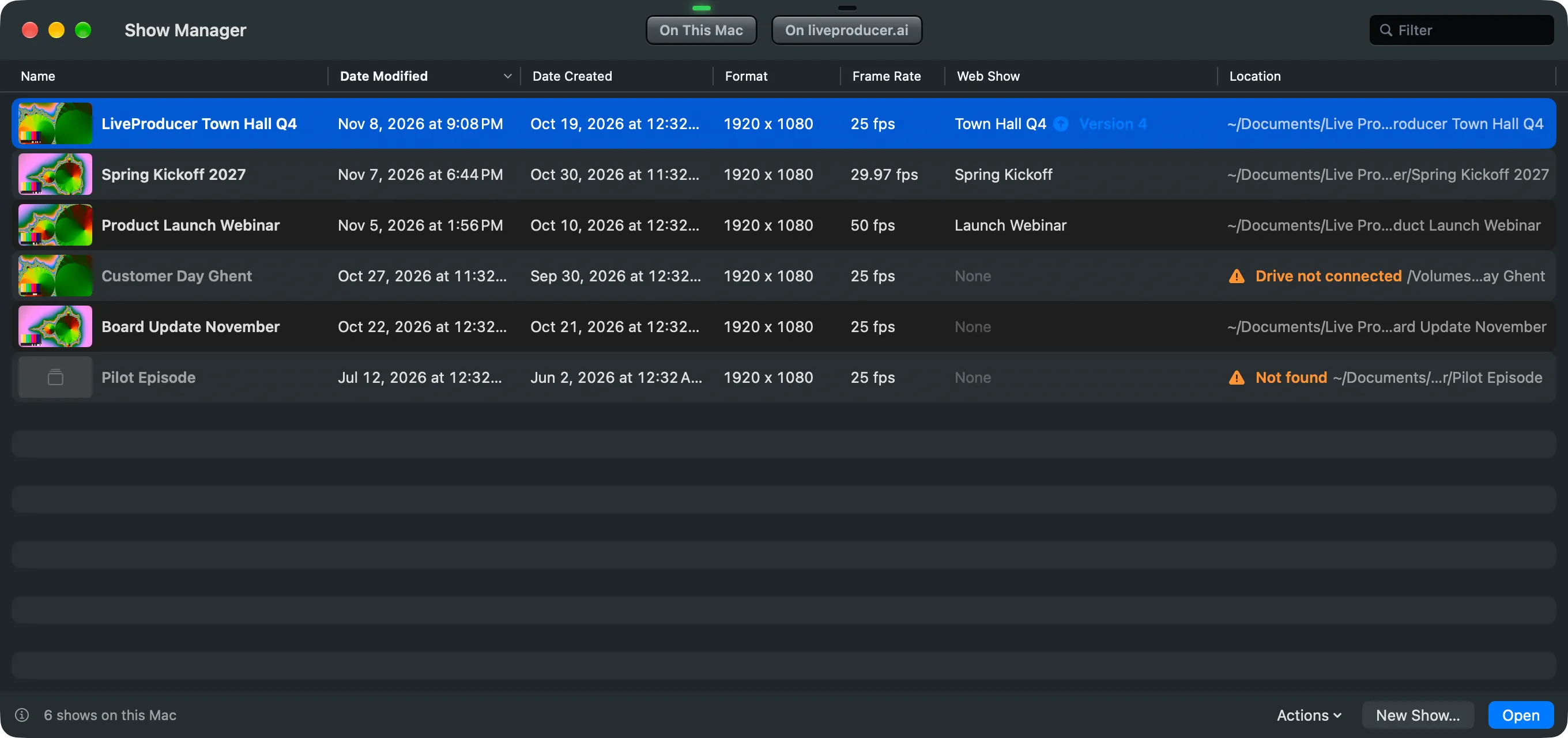
- Double-click a show to open it; the list marks the one that is open.
- Rename, duplicate without recordings, show in Finder, or move a whole show folder to the Trash from the right-click menu. See On This Mac.
- A show on a drive that is not connected says so, and Locate… finds one that moved.
- On the Platform lists your companies’ web shows, which are on this Mac, and New Show from Web Show… starts a show with a web show’s script and files. See Create a show.
- Without a network the list still opens every show on this Mac and shows the web shows as last seen.
Start on the list
Section titled “Start on the list”Settings › This Mac › Show Folders › At Launch can open the Shows window instead of the last show, and closing the main window then brings the list back. See Shows.
More info
Section titled “More info”Describes Live Producer 0.330 · 10 November 2026