
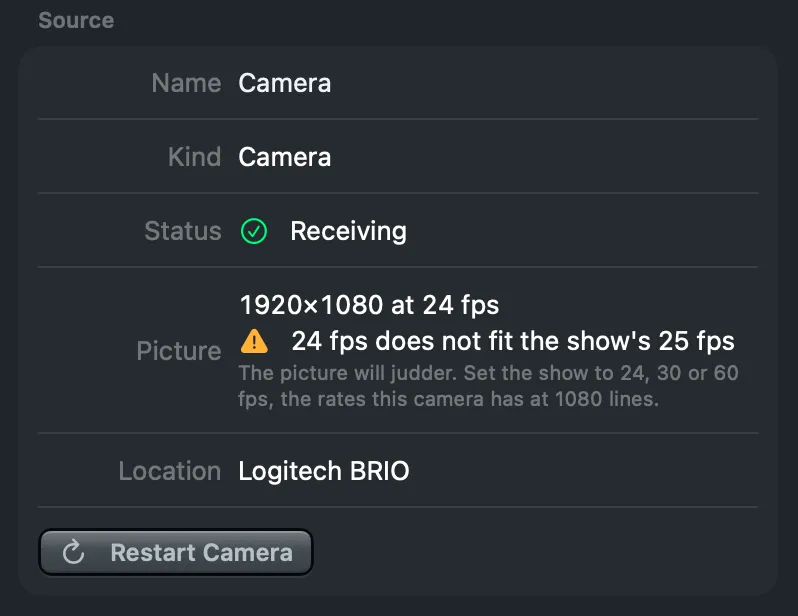
The inspector says in one line what a camera sends and which rate to set the show to when it does not fit; an unplugged camera returns on its own, and Restart Camera revives one that went quiet.
New and improved
Section titled “New and improved”Your camera at a glance
Section titled “Your camera at a glance”Whether a camera delivers, what it sends and whether that fits the show took three rows and a sentence to work out. The inspector’s Source section now says it in three: Status (Receiving, or what is wrong), Picture (the size and the frames of the last second, live, so a stutter shows as a dip the moment it happens) and Location (the camera as macOS names it). When the camera’s rate does not fit the show, a warning under Picture names both rates and the show rates this camera has, so you know what to set.
See Status and sync and Add a camera.
A camera that comes back
Section titled “A camera that comes back”Unplug a camera, or move it to another port, and its source says Camera disconnected, keeps its last picture on the program and takes the camera back by itself when it returns. A camera that goes quiet while still plugged in is set up again by the Studio after five seconds; Restart Camera does it at once, from Switcher › Restart Selected Camera, the tile’s menu or the inspector. A source never shows another camera while its own is away.
See Status and sync.
- Fixed a camera source showing a different camera while its own was not connected.
- Fixed a camera that was unplugged and plugged in again staying silent while its status said running.
More info
Section titled “More info”Describes Live Producer 0.330 · 10 November 2026