
Start a section where you are, move, merge or delete one, say who edits it; see which sections changed since the last version before you publish.
New and improved
Section titled “New and improved”Sections, from the script
Section titled “Sections, from the script”A showrunner starts a section right where the caret is: // and Start a Section Here, or
a heading line typed as in a script file. The words after the caret move into the new
section, and the sections after it move up a number, because a section’s number is its place.
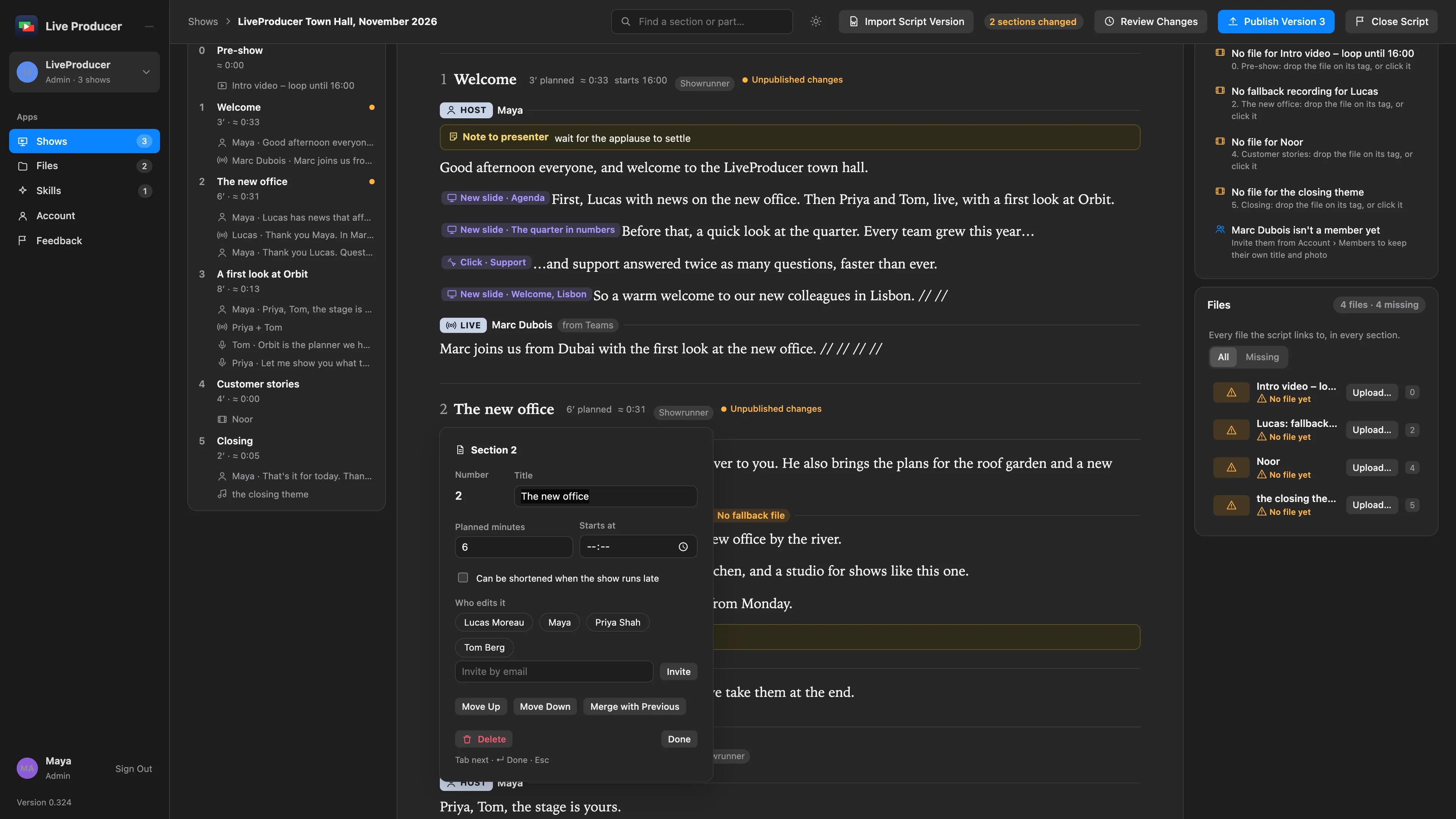
A section’s fields, opened from its title, move it up or down, merge it with the one before,
or delete it (a second press, so a slip costs nothing). The same fields say who edits the
section; the chips in its head follow for everyone at once. Contributors see all of it and
change none of it. See Arrange the sections.
What changed since the last version
Section titled “What changed since the last version”A section whose words differ from the last published version says Unpublished changes in its head, with a dot in the outline, and the Publish button counts them. Publish takes in everyone’s latest words first, then makes the version the Studio follows. See Publish a version.
More info
Section titled “More info”- Script editor: sections are the showrunner’s, and what Unpublished changes means.
Describes Live Producer 0.330 · 10 November 2026