
The program recording and the ISO recording each have their own folder, the show folder by default, and the Recording page says when a camera cannot reach the rate you set.
New and improved
Section titled “New and improved”A folder for each recording
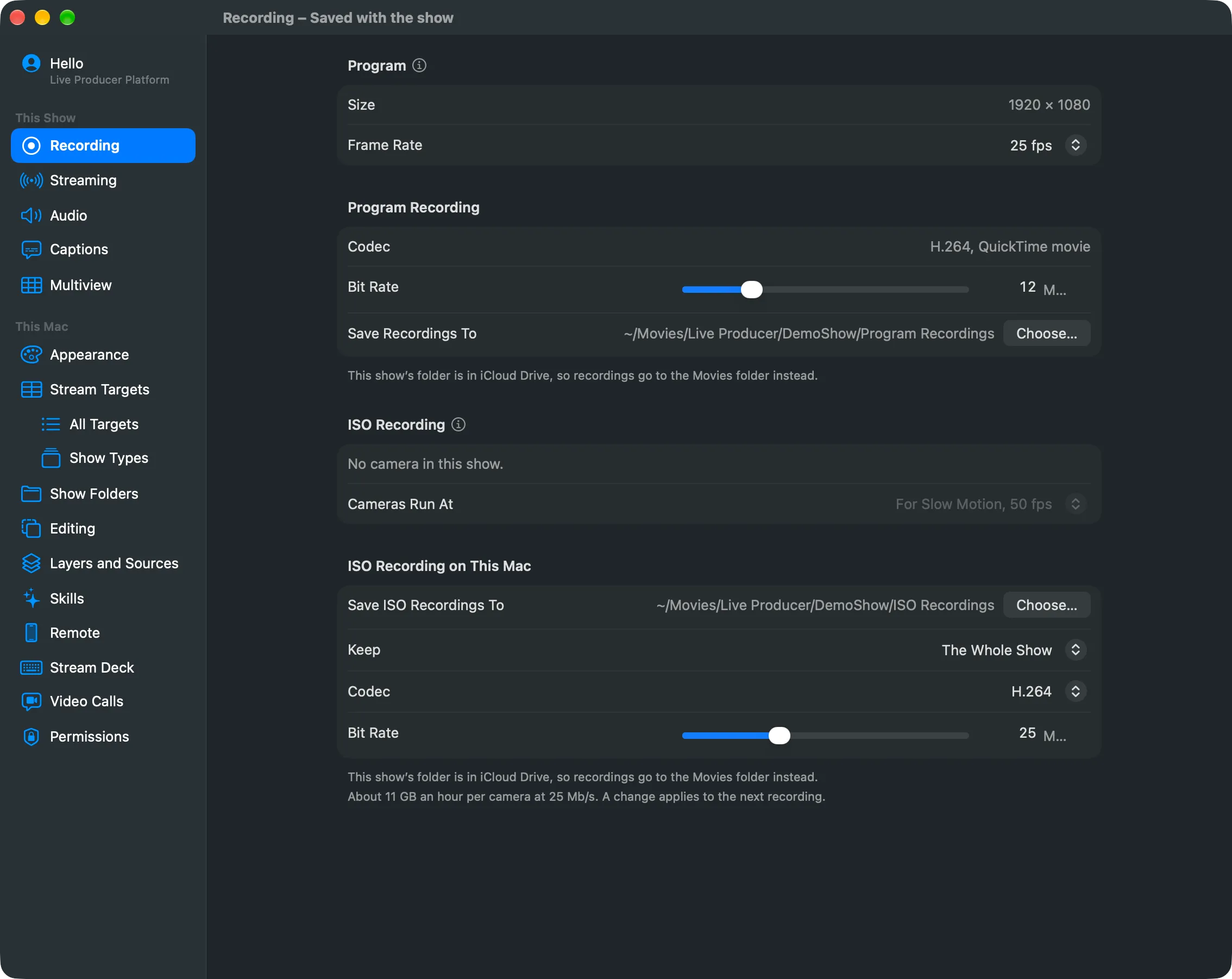
Section titled “A folder for each recording”The program recording and the ISO recording each have their own Save To row on Settings › This Show › Recording, showing exactly where the files go. By default they go into the show folder’s Program Recordings and ISO Recordings, so a show and its recordings stay together. Choose… sends either somewhere else, for example a fast external disk, and Use Default brings it back. See Recording and Record the program.
Shows in iCloud Drive record locally
Section titled “Shows in iCloud Drive record locally”When the show folder is in iCloud Drive, as it is with Desktop and Documents synced, the
recordings go to ~/Movies/Live Producer/<show>/ with the same two folders, so nothing
uploads while you stream. A folder you choose in iCloud Drive gets a warning on the page.
Cameras and the rate you set
Section titled “Cameras and the rate you set”Cameras now take the rate set under Cameras Run At as soon as the show opens. When a camera cannot reach it, as most webcams cannot reach 50 at 1080 lines, the Recording page names the camera and the rate it runs at, so you know slow motion from it repeats frames. See Record each camera.
More info
Section titled “More info”Describes Live Producer 0.330 · 10 November 2026