
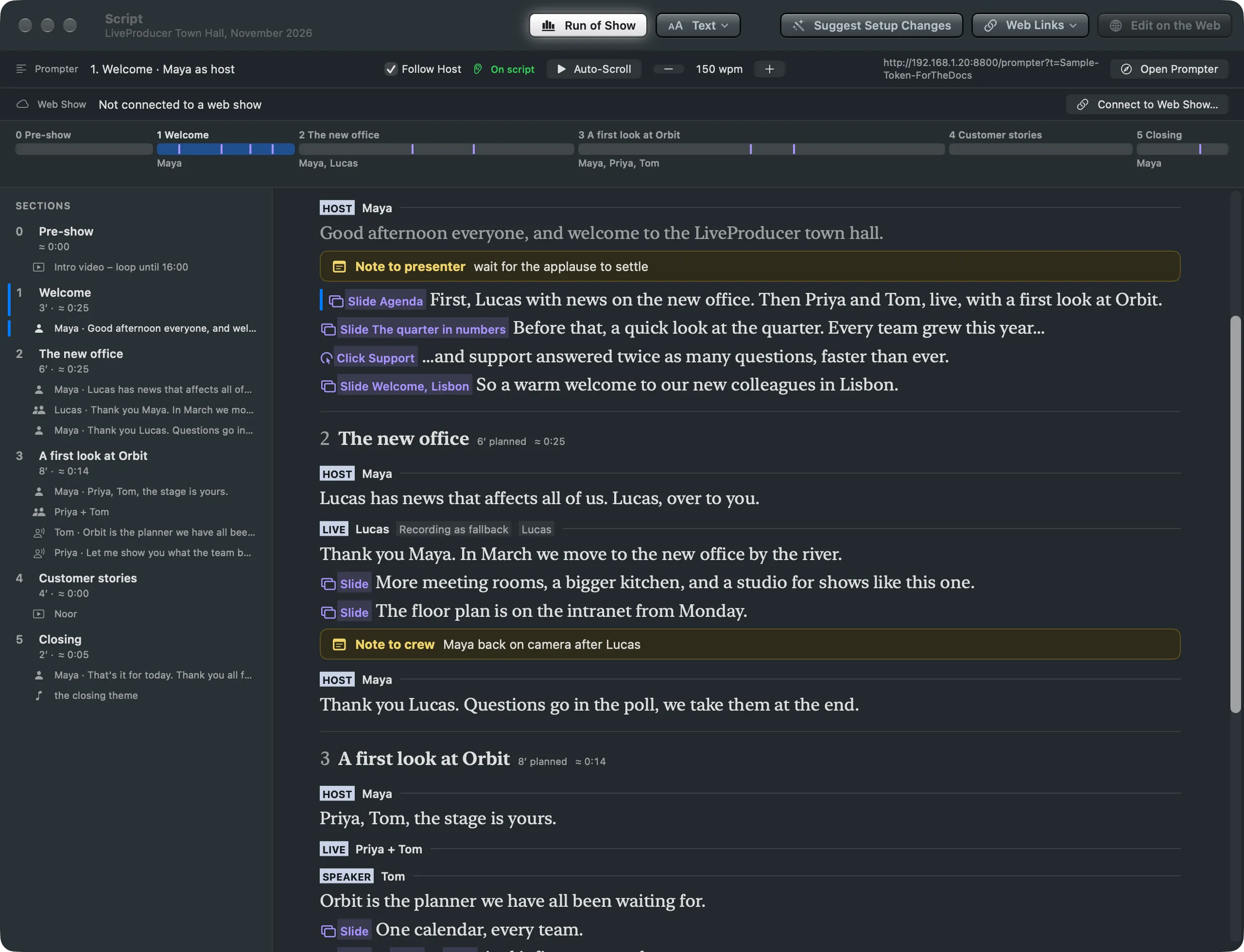
The Studio's Script window now lays the script out as the web's editor does, read-only, with the sections on the left and the words with their coloured slides, elements and notes on the right.
New and improved
Section titled “New and improved”The Script window looks like the script on the web
Section titled “The Script window looks like the script on the web”The script is written on the web and read in the Studio, and the two now look alike, so the operator follows the same page the writers made. The Script window shows the whole script the way the web’s editor does, read-only:
- On the left, the Sections column, as on the web: each section with its planned and estimated time, and its parts by who speaks and their first words. A click scrolls the script there.
- On the right, the script itself: each section’s title, each part’s tag, and the words with the slides, shots, lower thirds, graphics, audio and notes at their words, in the web’s colours. Notes sit in the same yellow box.
- The prompter’s place is marked in the script and in the column, and the script scrolls to each new part as the prompter reaches it, so you can follow along.
The editor’s right column, with Spelvin’s suggestions and the files, stays on the web. The Web Shows window draws a web show’s script the same way. Words in the List is gone: the words are always there now.
See Script window.
- Switching the Script window between List and Timeline, or changing the Timeline’s zoom, sometimes changed nothing until something else in the window moved. The window now changes at once.
More info
Section titled “More info”Describes Live Producer 0.330 · 10 November 2026