
Paste or type words without tags, let Spelvin suggest the parts, slides, script tags and notes, and accept the ones that fit.
Turn free prose in the script into a tagged part of the show, with Spelvin suggesting the tags and you deciding on each. To read what Spelvin does in the script, see Spelvin in the script.
Before you start
Section titled “Before you start”- You may edit the section: you are an admin or a showrunner, or the section is assigned to you.
- The company’s Spelvin allowance is not used up; the button says so when it is.
Step 1: Put the words in
Section titled “Step 1: Put the words in”Paste the text where it belongs in the script, or type it. Several lines pasted without any
direction in them land as plain words, and a small line offers Tag with Spelvin right
away. Text typed the old way ([Ann live], New slide ---- Agenda) is tagged as you type and
needs no Spelvin; see Insert a tag.
Step 2: Ask Spelvin
Section titled “Step 2: Ask Spelvin”Select the words, or leave the caret in the part they belong to, and click Tag with Spelvin in the bar above the script. Spelvin reads the selection with the part before it for context and answers in a few seconds. One press is one action.
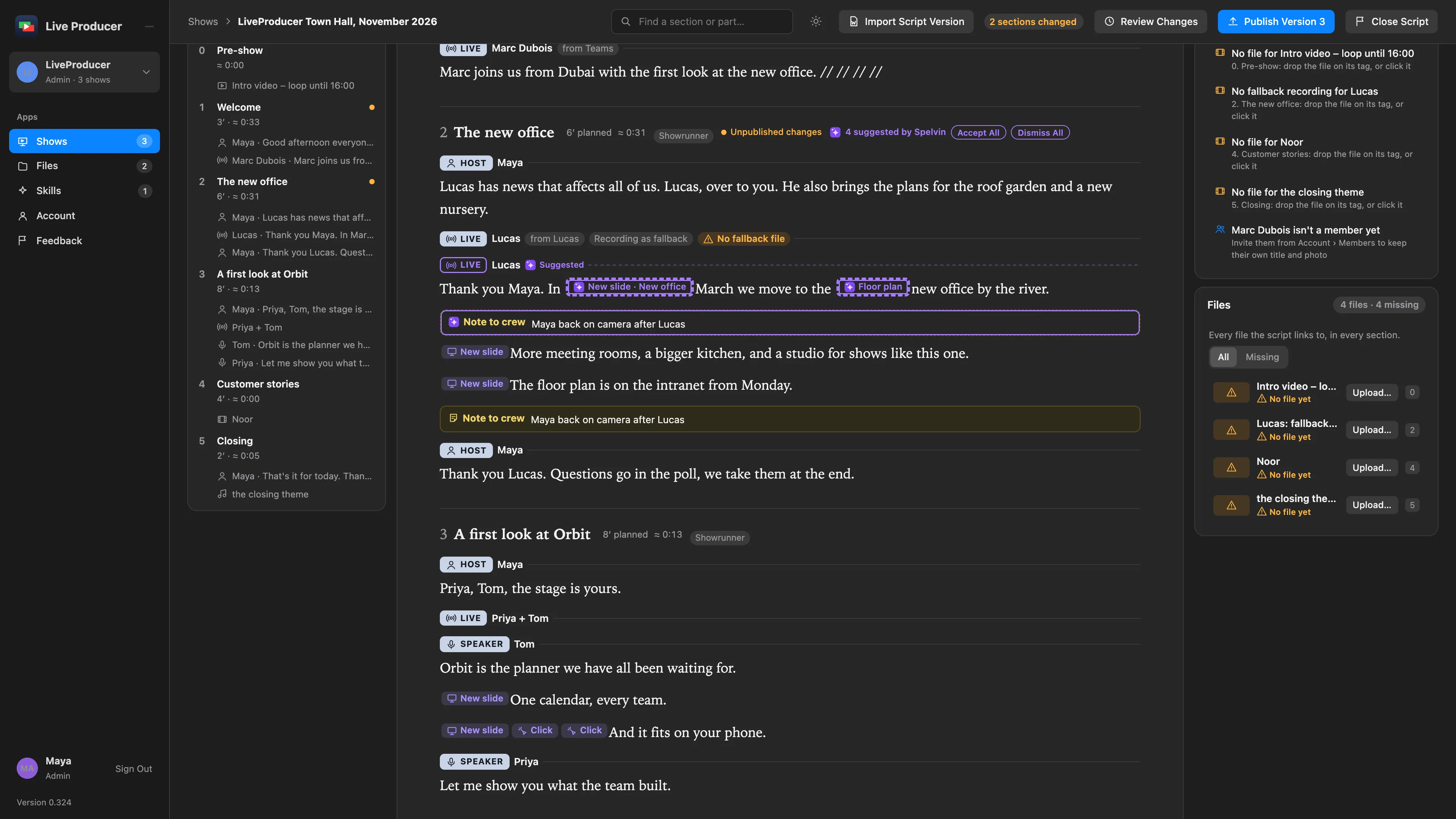
The suggested tags appear faint, with Spelvin’s mark: a part tag on its own line with who speaks, a slide or a build in the words, a script tag at its word, a note for the crew or the presenter. The words are exactly as you pasted them.
Step 3: Accept or dismiss each
Section titled “Step 3: Accept or dismiss each”Click a suggested tag. Its fields open with Spelvin’s reason at the top; change a field if you like, then click Accept, or Dismiss to remove it. Accept All and Dismiss All in the section’s head take the rest in one go.
An accepted tag is a tag like any other. A suggested one that is still faint when the show is published is left out of the version.
Verify
Section titled “Verify”- No tag in the section is faint, and the section’s head no longer counts suggestions.
- The outline lists the new parts with their people.
- The Checks card names nothing in the section, or only what you still mean to fill in.
Related
Section titled “Related”Describes Live Producer 0.330 · 10 November 2026